
Introducing Inbox: A Unified Customer Support Experience
March 2nd release: Inboxes and Conversations, extended Email integration, Customer Portal Real-Time Messenger, and other customer support notes.
As Pilot grew and faced the need to establish proper customer support channels for our own company, we learned what it means to properly aggregate and process customer inquiries. In the process, we realized that labs need specialized customer support software as well, so that's what this update is about. We are starting to expand our tools for customer support teams to properly serve your customers.
Customers reach out in a dozen different ways — emails, phone calls, customer portal messages, the occasional texts. Until now, keeping track of all that meant juggling tabs, forwarding threads, and hoping nothing fell through the cracks.
Those times are over.
We're making Pilot the best place to manage your entire customer experience. On March 2nd, Pilot is releasing the first set of features that support this vision. Introducing Inbox — a centralized communication hub that brings every customer interaction into a single place.
Managing the Pipeline
Customer support is a task pipeline, just like any other manufacturing task queue. The difference is that the customer inquiries can come from various sources. The main sources of customer inquiries are emails, phone calls, customer portal messages, and occasional SMS/WhatsApp. The inquiries can be anything (e.g., billing questions, case change requests, and shipment tracking) and should be triaged to the appropriate individuals/teams that handle those types of requests. Sometimes, multiple people need to collaborate to process an inquiry.
Pilot LMS Inbox is designed to handle this workflow end-to-end.
Conversations flow in from various channels, land in one central place, get triaged, worked on, and closed. Inbox is that central place. At launch, Inbox supports two live channels: Email and the Customer Portal Messenger. Customers can email your lab directly or start a conversation through the chat widget on their customer portal — either way, it lands in Inbox. You can also manually log conversations that happened outside of Pilot: phone calls, SMS exchanges, WhatsApp messages, or anything else.
We're actively building native support for calls, SMS, and WhatsApp as direct channels, so those will flow into Inbox automatically too.
Inbox and Inboxes
There's Inbox — the unified view of everything — and then there are individual team inboxes (lowercase, plural). An inbox is a bucket you define based on whatever makes sense for your lab. Maybe you split by request type: Cases, Billing, Shipping. Maybe you split by team: Front Office, CAD, CAM.
Conversations get triaged into inboxes, assigned to specific team members, and worked through.
Conversations
Pilot LMS used to support only case-level communication with separate message and comment threads. With the new update, we're combining messages and comments under one central concept - Conversations.
Conversation is a single, continuous thread on a specific subject that collects everything related to a customer interaction. A conversation can be linked to a customer, a billing account, and one or more cases; and it can have both external and internal communication linked to it.
Within each Conversation, there are two distinct interaction channels:
Messages are the external channel. Messages get delivered to the customer — via email, via the portal messenger, or both. When a customer replies, their response shows up as a message too. This is the back-and-forth your customers see.
These are notes visible only to your team. Use them to loop in a colleague, document a decision, or flag something that needs attention. You can @mention teammates to surface the conversation in their Mentions view. Comments never reach the customer.
On every conversation, you can see statistics, such as: Time to First Reply (TTR), Time to First Assignment (TFA), Time To Close (TTC); and see how long you've been waiting on the customer's response for. More customer support analytical tools are coming soon.
What's Changing on Cases
With Inbox in place, we're rethinking how communication surfaces on individual cases. Here's what's new:
- 1We're putting communication, important warnings, and notes to be on top of the “Details” tab on the case view. Line Items, Tasks, and Files are kept untouched, but will appear a little lower.
- 2Because case comments are no longer apart from the “conversations”, which require external communication, we take away an important case-specific ability: to put a “sticky note”, so to speak, either for a lab member or a customer to see. For that, we're introducing color-coded Case Notes that you can show or hide from a doctor.
- 3We pulled out warnings and communication out of the Timeline tab, which means only a simplified Details Changelog remained on that tab, so we decided to remove it. Now case view will only have Details and Changelog tabs.
- 4Because 6 sections may take quite a bit of space on the screen, we made all sections collapsible, so you only see the sections that are most important for you.
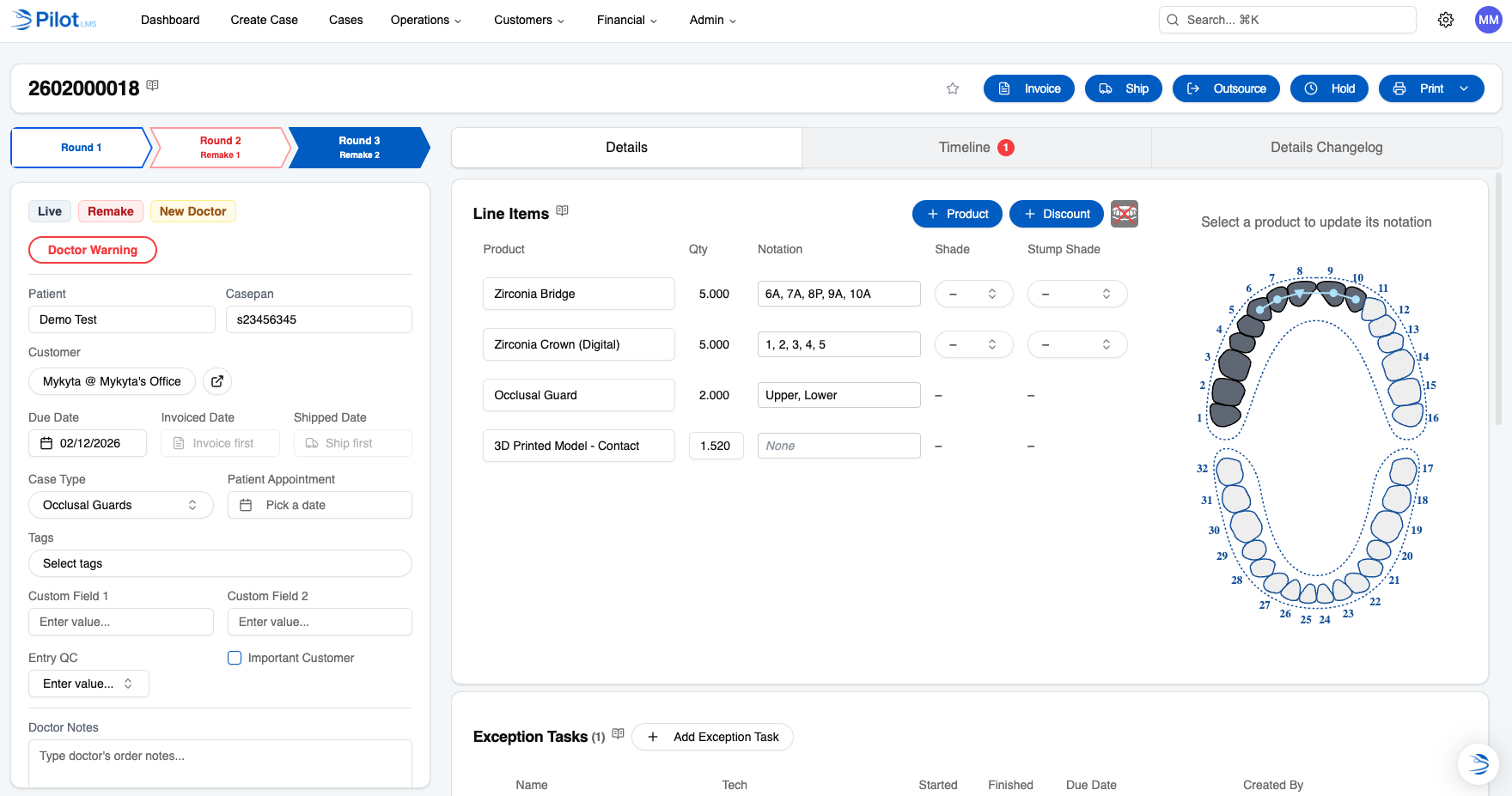
Before: details only include line items, tasks, and files
Before and After
| Concept | Before | After |
|---|---|---|
| Communication - Scope | Limited to case-related inquiries | Any customer interaction can be processed |
| Communication - General | Separate message and comment threads | Internal and external interactions are combined into conversations, so you can collaborate with multiple lab members when you're processing a customer interaction. |
| Communication - Pipeline Management | No proper triaging/assignment | Easily categorize a conversation, assign who's responsible for resolving it (team or person), and track basic customer support metrics |
| Cases - Tabs | Multiple tabs with very particular layouts | One tab for all main case-related things, the other tab is for event logs |
| Cases - Notes | No concept of notes. Functionally accomplished by comment threads. | Now you can leave case notes, color-code them (like sticky notes), and set visible to customers who use your customer portal. |
| Inbox - Email Integration | – | Now we support full self-service inbound and outbound emailing. It means you can at any point just add an email that you want to be used for sending automatic notifications (invoices, statements, messages, etc.), but also to route the customer emails from into our Inbox. You can add many emails to fully centralize all your emails into one place. We support email threading, inline images, attachments, links, and basic text formatting, so you can talk like you would via email. |
| Inbox - Customer Portal Messenger | – | We added a chat widget to our customer portal, simply called "Messenger". Your customers can log into their portal and message you directly in real-time, which will land into your Inbox. |
Before
Limited to case-related inquiries
After
Any customer interaction can be processed
Before
Separate message and comment threads
After
Internal and external interactions are combined into conversations, so you can collaborate with multiple lab members when you're processing a customer interaction.
Before
No proper triaging/assignment
After
Easily categorize a conversation, assign who's responsible for resolving it (team or person), and track basic customer support metrics
Before
Multiple tabs with very particular layouts
After
One tab for all main case-related things, the other tab is for event logs
Before
No concept of notes. Functionally accomplished by comment threads.
After
Now you can leave case notes, color-code them (like sticky notes), and set visible to customers who use your customer portal.
Before
–
After
Now we support full self-service inbound and outbound emailing. It means you can at any point just add an email that you want to be used for sending automatic notifications (invoices, statements, messages, etc.), but also to route the customer emails from into our Inbox. You can add many emails to fully centralize all your emails into one place. We support email threading, inline images, attachments, links, and basic text formatting, so you can talk like you would via email.
Before
–
After
We added a chat widget to our customer portal, simply called "Messenger". Your customers can log into their portal and message you directly in real-time, which will land into your Inbox.
What's Next
Inbox is the foundation, and we're building on it fast. Here's what's on the roadmap:
Native call, SMS, and WhatsApp integration so every channel flows in automatically.
Get notified and collaborate on conversations without leaving your team chat.
Turn conversations into actionable tasks with due dates, assignments, and tracking.
Auto-assign, auto-triage, and auto-respond based on rules you define.
We're just getting started. Inbox is the first step toward making Pilot the place where your entire customer experience is managed — not just your cases.